Evolver/PolyEvolver Morpher
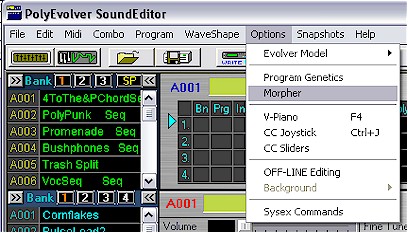
An added feature to supplement the creative process is the Evolver/PolyEvolver Morpher. It is a complement to the Genetics sub-function Morph found under Options. Morpher is accessed in the Options drop down menu by selecting Morpher found just under Program Genetics. The user should first be in Combi or Program Play Modes before engaging Morpher.
The Program Genetics function generates 127 offspring from a selection of any two parent programs from any one or two User Banks. Morph smoothly combines the various parameters to generate an incrementally different set of offspring. Each offspring can be auditioned one at a time. The draw back is that each of the offspring must be auditioned separately. The Morpher allows real time auditioning of all offspring as they are generated using a continuous slider.
The Morpher window (below) opens preloaded with User Bank 1 when in either Play or Combi Modes.
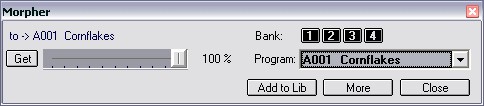
User Bank programs are found by using the list box to the
right  . The Bank
buttons
. The Bank
buttons  allow the user
to toggle between the four User Banks. The first program
allow the user
to toggle between the four User Banks. The first program  listed at the top of the selected User Bank is loaded in as the destination
program
listed at the top of the selected User Bank is loaded in as the destination
program  for the
Morpher.
for the
Morpher.
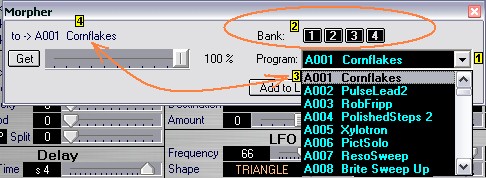
The Base program to Morph from is selected from the User Bank in the active Editor window. The window has one horizontal slider to control the degree of morphing (as read in percent: 0 to 100% ) between two programs you have selected. As you move the slider the each generated offspring is auditioned as it is created.
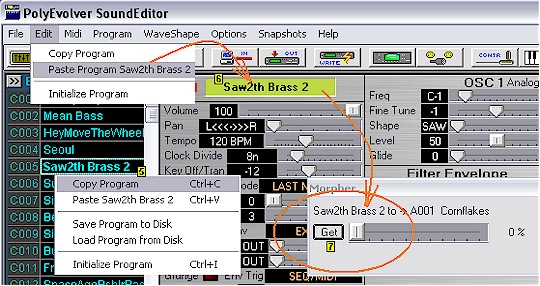
To load the Base program, left click to select
and then right click and copy desired program from Editor User Bank  ,
use main window Edit menu to paste the program to the Editor
,
use main window Edit menu to paste the program to the Editor  and the click the Get button
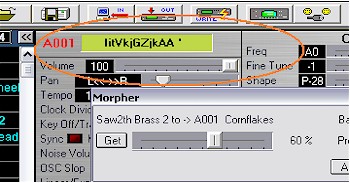
  on the Morpher window. In our example as seen below we selected "Saw2th
Brass2" by copy and paste and then loaded it into Morpher with Get. The
slider is to the far left so the Base program, "Saw2th Brass2" is the
only component in the Morph.
on the Morpher window. In our example as seen below we selected "Saw2th
Brass2" by copy and paste and then loaded it into Morpher with Get. The
slider is to the far left so the Base program, "Saw2th Brass2" is the
only component in the Morph.
With the slider moved over to 60%, "Saw2th Brass 2" is now 40% and A001 Cornflakes contributes 60% of attributes of the generated offspring "IitVkjGZjkAA '". Names for offspring are random for Morph. All normally user controlled Editor parameters described by sliders and labels move in tandem with the Morphing function in real time. The currently auditioning offspring's name is displayed in the Editor's program name panel.
Any generated offspring from the Morpher can
instantly be preserved by clicking the  button. The Librarian does not have to have been previously opened. If after a
session of several Morphing experiments that resulted in several choice
offspring being added to the Library the user opens the Librarian, all the
offspring previously selected will be there. (below)
button. The Librarian does not have to have been previously opened. If after a
session of several Morphing experiments that resulted in several choice
offspring being added to the Library the user opens the Librarian, all the
offspring previously selected will be there. (below)
A powerful feature of the Morpher lies in the use of the Add to Lib function to preserve an interesting or promising offspring and then click the Get button to add the offspring as the Base. The Morpher will then morph the offspring with the Destination program previously selected. The destination can be changed at any time by click on an new program choice selected from the User Bank in the drop down list box.

Note that the top 10 are all offspring generated messing around with the 4 presets at the bottom of the list. The 14 programs are loaded into a - Not Assigned - Category for the time being. (above)
CONTROL FEATURES
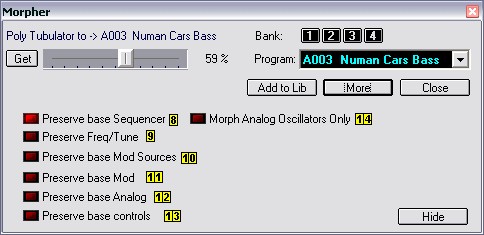
Further features are found by clicking the  button found just under the User Bank list box. Several parameter use/control
features are now available.
button found just under the User Bank list box. Several parameter use/control
features are now available.


The functions in order:
If you do not want to use, or see, the added
control features click the  button to reinstate the mini window.