The Preset Genetics window is selected from the Options menu of the main page, or from the Editor window under the Generator menu. Genetics allows you to quickly build new sounds from two existing ones in a similar fashion to breeding. Parameters of each of the two sources (parents) are combined using four different functions to generate a new bank of presets (kids).
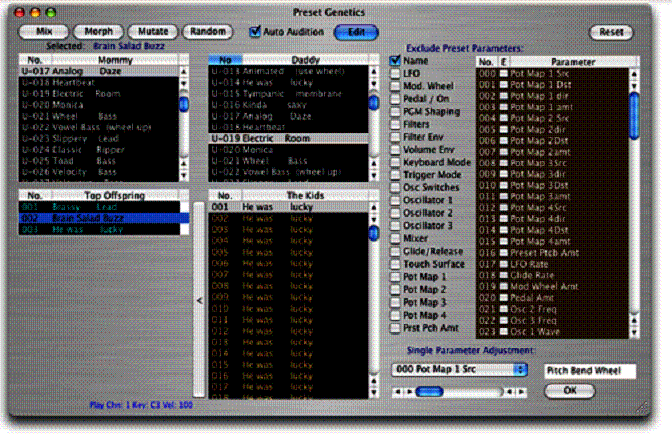
A view of the Preset Genetics window is shown below. The two source banks (parent banks, also called mommy and daddy) are located in the upper left, along with buttons for the four different genetics functions. The generated bank (kids) and the top offspring bank are located in the lower left. On the right is a scrollable filters window that allows user-selected parameters to be excluded from the genetics function. Directly below the filters window is a single parameter adjustment function that permits you to change one of the preset parameters for an entire Voyager bank.
Both parent banks use the presets from the User Bank, and these banks will automatically load when the Preset Genetics window is opened. Any pair of the 128 available presets can be used for the genetics functions (one each from mother and father). The result of applying the user-selected genetics functions creates the child bank, and any ‘keepers’ auditioned from the child bank can then be moved into the top offspring bank.
The four Preset Genetics functions are:
Mix: The parameters of each child preset are randomly chosen from either a parameter from the mother or father source. For example, if the mother’s cutoff frequency was 10 and the father’s was 88, the child’s value would only be 10 or 88.
Morph: The value of each parameter is linearly interpolated from one parent to the other. The first child is identical to the mother; the last child is identical to the father. All others are weighted towards each parent depending on their placement within the list. The middle child preset is exactly 1⁄2 mother and 1⁄2 father.
Mutate: The
parameter values of each child preset are randomly chosen from within the range
between each parent’s parameter. For example, if the mother’s cutoff
frequency was 10 and the father’s was 88, the child values would be anywhere
between 10 and 88.
Random: The
value of each parameter of each child is produced by a random number from within
the min/max Voyager parameter range.
Note: Experimentation by using vastly
different parents and similar parents creates the most interesting results. You
can also ‘interbreed’ the child patches, too. In addition, you can set
filters to excluded parameters that will not take a part in the generation of
new offspring. Experiment and have fun!
Note: Preset names in the Kids bank also become scrambled or rearranged
when you use the Genetics functions. This is normal. You can prevent preset
names from changing by checking the Name
box under ‘Exclude Preset
Parameters’. When the Name box is
checked, all preset names in the generated Kid’s bank will assume the selected
preset name from the Mommy bank.
The Auto Audition checkbox enables automatic transfer of the selected presets from the mother, father, kids or top offspring banks to the Voyager's edit buffer. When the Auto Audition checkbox is unchecked (disabled), no data is transmitted to the Voyager.
The Edit button
brings up the Editor window, permitting on-screen editing of the selected preset
from the mother, father, kids or top offspring banks. The Auto
Audition button must be checked for the Editor to correctly display the
selected preset in the Genetics window.
The Reset button
resets all selections made under the ‘Exclude Preset Parameters’ section.
When the Reset button is clicked, any checked selections become unchecked.
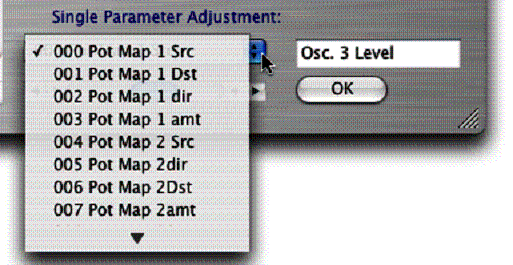
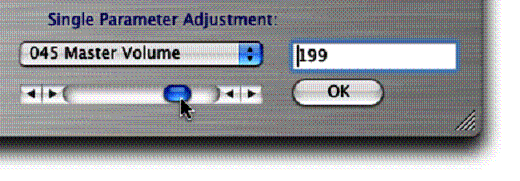
This function allows you to change one of the preset parameters for an entire Voyager bank. For example, say you want to change the Volume or Keyboard Mode for all presets in a bank – now it can be done with just one click! Simply select the desired parameter from a pull-down menu and use the slider control to set the value.
The pull-down menu contains more than one hundred different parameters to choose from. The first seven are shown here:
With a parameter selected, use the slider control to set the desired value:
When you click OK, a new Kids bank is generated from the Mommy bank. Every preset in the Kids bank now contains the newly modified parameter. To save the change, select Replace Voyager Bank with the Kids Bank from the FILE menu. Clicking OK will send the Kids bank to the Voyager. Clicking No will not update the Voyager bank, but will update the Mommy and Daddy banks with the changes, allowing you to make additional changes if desired.
Note: Numerical values for Single
Parameter Adjustment are displayed as 8-bit values (0-255) when the Editor
Parameter Resolution is set to 8-bit resolution. Numerical values are displayed
as 16-bit values (0-65535) when the Editor Parameter Resolution is set to 16-bit
resolution.
Presets
created in the Genetics window can be moved in several ways:
·
Selected
presets can be dragged from either the Top
Offspring or Kids bank directly
into any Librarian category.
·
Selected
presets can be dragged from either the Top
Offspring or Kids bank directly
into the User Bank. When dragging a preset to the User Bank, a message dialog
will be displayed asking if you also want to write the preset to the Voyager's
bank:
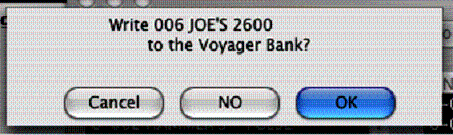
Clicking OK will send the Top Offspring or Kids preset to the Voyager. Selecting No will
not update the Voyager bank, but will update the Users Bank with the change. Selecting
Cancel will cancel the operation.
The Genetics File menu is
shown below:
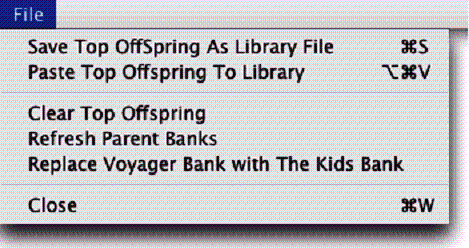
Save Top Offspring As Library File permits saving the complete Top Offspring bank as a separate library file, regardless of the number of presets in the bank.
The Close command will close the Preset Genetics window and return you to the main window. Alternatively, you can also click the red button in the upper left corner: