PROGRAM BANK MODE
Use Mode button  to switch to PROGRAM BANK MODE. PROGRAM BANK MODE corresponds to Triton's
PROGRAM (PLAY) mode. Since Tri-EditPro is fully interactive you can press PROG
button on Triton and the editor will automatically switch to PROGRAM BANK MODE.
In this mode the editor displays all Triton's Program banks: Internal RAM, GM and
EXB. After Receiving banks from Triton or loading the data from files, banks
display all their programs names. In this window you can organize, rename, copy and
paste or drag programs from one place to an other. If there is too many
Program Banks to display in the window you can make banks to appear smaller by
clicking on
to switch to PROGRAM BANK MODE. PROGRAM BANK MODE corresponds to Triton's
PROGRAM (PLAY) mode. Since Tri-EditPro is fully interactive you can press PROG
button on Triton and the editor will automatically switch to PROGRAM BANK MODE.
In this mode the editor displays all Triton's Program banks: Internal RAM, GM and
EXB. After Receiving banks from Triton or loading the data from files, banks
display all their programs names. In this window you can organize, rename, copy and
paste or drag programs from one place to an other. If there is too many
Program Banks to display in the window you can make banks to appear smaller by
clicking on  "Bank X" label or move
them to the left
"Bank X" label or move
them to the left  .
.
In this window you choose Programs and
Triton will also automatically switch to that Program so you can audition it or
select it for editing. To select Program click on its name in any bank  .
The selected program's name should appear in name box
.
The selected program's name should appear in name box  .
If it does not, then check midi communication .
.
If it does not, then check midi communication .
Note: If Triton does not switch from one bank to
another check Bank Map setting.

There are two different ways to copy and paste
programs that give great amount of flexibility.
1) By using Edit menu. From Edit menu a copied
PROGRAM is copied from program "buffer" that is displayed in Program
Name Box . The same with pasting, a pasted
program is pasted to a "buffer" that gets displayed in the name
box.
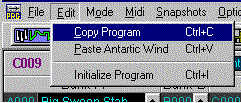
2) By using right mouse button pop-up menu.
PROGRAM is copied from program location. If pasted using pop-up menu, a pasted
program is actually being written to the selected location.
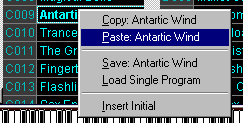
You can use both ways combined. For example, use Edit menu to copy current program as it sounds or after
it was edited
and then paste it to any new location using pop-up menu. If you loaded a bank
from file, you can copy it using pop-up menu and then paste it using Edit menu.
In this case a pasted program will not be written to Triton but dumped to a
"buffer" so you can audition it, check it's sound etc. These are
just simple examples. Copied Triton Program is available for pasting throughout
the editor.
Tool bar buttons  are used to request and send current Program buffer from Triton. Write button
  displays WRITE PROGRAM dialog where you can rename and write the program to Triton.
To prevent accidental moving of Programs in
banks, an option, "Enable Drag-Drop between banks," has to enabled
before you can drag and drop Programs freely.

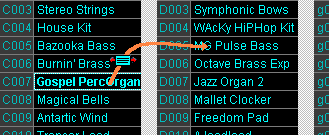
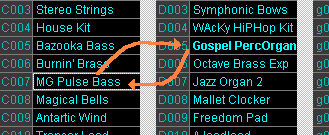
Dragging and Dropping Programs in PROGRAM BANK
MODE window exchanges one program with an other as you can notice on
pictures below (Gospel PercOrgan has been exchanged with MG Pulse
Bass). Physical banks in Triton are also automatically updated with changes.
To change "Category" of a current
Program click on Category label:
