or Combi
  Modes. From the File drop down menu select Karma Banks Manager
  .
.Karma BANKS MANAGER
Karma Banks Manager is a powerful organizational tool of Karma EditPro. Banks can be structured and saved in a form that is most efficient for the user. The Banks manager can be used to organize or check on the state of the loaded banks before opting to send the data to Karma and/or the Editor. This feature is an important safeguard to accidental overwriting of unsaved loaded programs in Karma RAM.
Karma Bank Manager is accessed when in
Program or Combi
Modes. From the File drop down menu select Karma Banks Manager .

Once in the Bank Manager window the user can elect to start New or load data in two ways. Load All User Banks Data or Load from a previously saved file using the File drop down menu. These files are saved with .kar extension. These are not PCG files though PCG files may be loaded.

Data can also be loaded from Program, Combi, Drum Kit and Pattern files individually by selecting the tool menu button and selecting Load Bank from their respective menu (next image.)

Global settings can be Inserted as well from tool
bar button  .
Select option from dropdown menu.
.
Select option from dropdown menu.

All loaded Program or Combi Banks, Drum Kits, Patterns and Global Settings can be removed entirely through the same menu options if needs be.
After loading the data from the selected source
to Karma Bank Manager the bank is selected by clicking one of the tool bar
buttons  causing the
Manager to load the Program and Combi bank list for organizing.
causing the
Manager to load the Program and Combi bank list for organizing.

Individual programs can be copied and pasted between Program banks. By example, if you have selected Bank A (as in image above) you can right click on "Acoustic Piano AT," select Copy by right clicking, then change banks by clicking on B, this loads into the Program Bank list all of Bank B, by right clicking on a list member and selecting Paste you will over write the program in A with "Acoustic Piano AT" from A.
Note: you can NOT copy and paste between Program Bank and Combination Bank list.
Another useful feature of the Karma Bank Manager is the
Show Property function  .
Click checkbox to activate. When activated, the selection of a program in the
Program Bank list box generates a summary of Parameters, Mode and list of
Combinations program is used in. This will be displayed in a separate window
.
Click checkbox to activate. When activated, the selection of a program in the
Program Bank list box generates a summary of Parameters, Mode and list of
Combinations program is used in. This will be displayed in a separate window  .
By clicking on the
.
By clicking on the  portion of the window the number of combinations this program is used in and the
list of the combination names, that includes channels used, is generated
immediately below
portion of the window the number of combinations this program is used in and the
list of the combination names, that includes channels used, is generated
immediately below  .
.

To the right of Show Property, in Program (Play)
Mode, is the Auto Program Audition feature  .
The program selected is automatically available in Editor for use. It is only
available in Program Mode.
.
The program selected is automatically available in Editor for use. It is only
available in Program Mode.

The individual programs can all be renamed within
the Bank Manager by double clicking and retyping the name  .
.

TRANSMITTING DATA TO Karma
When all desired work is finished on the banks
Bank Manager allows for all work to be sent to Sound Editor and/or Karma through the File menu  .
.

When Transfer All to Editor is selected the program sends the reorganized banks to the Editor and then prompts the user with a pop up window as to weather the data should be sent to Karma as well.
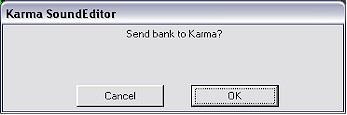
If Ok is selected the program will prompt for
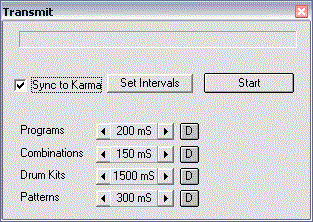
user to Set Intervals for transfer for Programs, Combinations, Drum Kits and
Patterns  .
.
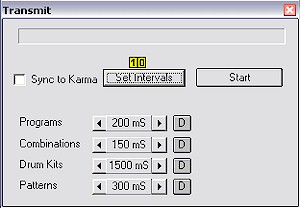
The bank data Transmission to Karma has to be slowed down for Karma to process the incoming data. In Karma-EditPro long transmission time can be optimized by setting time intervals between dumps. Default values were tested and should work correctly. In case, when at the end of the transmission you see "Midi Receive Error" displayed on Karma's LCD, interval time should be increased.
Sync to Karma option ensures correct transmission but is much slower since Karma-EditPro has to wait for "received complete" signal from Karma before sending another data dump.