to switch to PROGRAM (PLAY) MODE. Use
  to move into Program Edit Mode. From here select
  (at this point you can choose a drum kit to edit from name box) and then select
  to enter Drum Kit editing mode. Here select
  .
. DRUM INSTRUMENT LIBRARY
Use Mode button
to switch to PROGRAM (PLAY) MODE. Use
to move into Program Edit Mode. From here select
(at this point you can choose a drum kit to edit from name box) and then select
to enter Drum Kit editing mode. Here select .
In the pop-up window one, or a selection of, drum kit(s) can be added, sorted, auditioned and then renamed prior to saving as a stand alone library for future use.
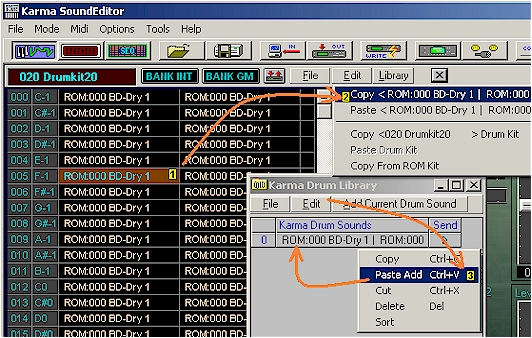
To populate the library, first select a drum kit
to be edited from the bank with a left click  ,
copy selection with Edit in main window menu
,
copy selection with Edit in main window menu  (you will be given the copy option with the name of the selection noted), select
Paste Add from Edit in library pop-up window
(you will be given the copy option with the name of the selection noted), select
Paste Add from Edit in library pop-up window  .
.
The program in library can be edited by drum
editor functions. The edited drum kit can be added to the library list by
clicking Add Current Drum Sound button. The edited drum kit sound can be renamed
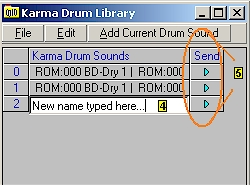
for saving by double clicking on the name and typing new name  .
Selecting send
.
Selecting send  for any of the loaded sounds sends the parameters to the editing
board for further work and auditioning.
for any of the loaded sounds sends the parameters to the editing
board for further work and auditioning.