MOPHO PLUGSE SUPPORT PAGES
The PlugSE VST dll file should be placed in the VST plugins folder. Depending on the VST host that folder could be located in various places on you hard drive. In case of Steinberg’s Cubase this folder is located in the Cubase directory and it is called “Vstplugins”. In Ableton Live the Vst folder can be selected and defined in Preferences.
The PlugSE is designed to serve as a bridge between the host and the Mopho and in principle the Mopho should be connected directly to the PlugSE via MIDI. By default, most of the VST hosts are set to grab all MIDI ports on startup and this may create a connection problem for PlugSE users.
Many MIDI interfaces are not multi-
Even if your MIDI interface is multi-
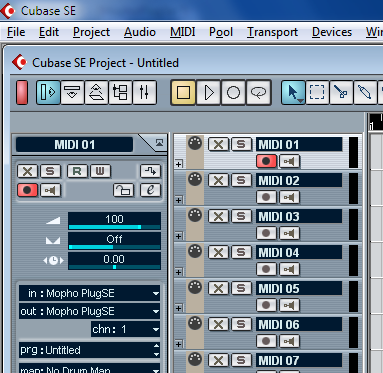
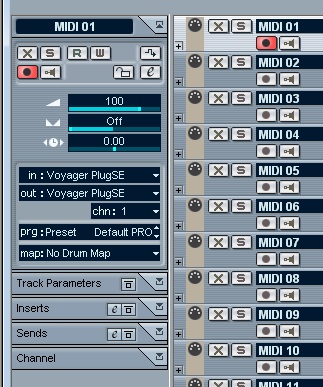 In Track Inspector you can select Mopho PlugSE for IN and OUT. This will allow to
record and playback notes, pitch wheel, modulation and other MIDI data.
In Track Inspector you can select Mopho PlugSE for IN and OUT. This will allow to
record and playback notes, pitch wheel, modulation and other MIDI data.
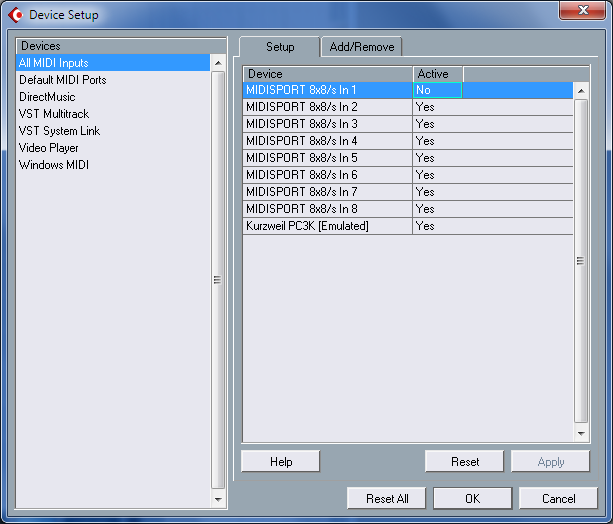
For example, we have our Mopho connected to MIDISPORT 8x8 ports 1 IN and OUT. We want to make sure that Cubase does not access those ports so we need to deactivate them in the Device Setup.
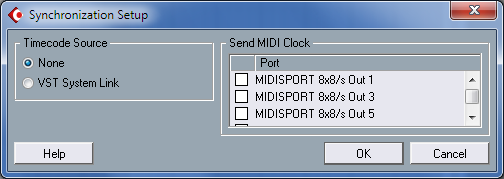
Also, Synchronization Setup should be checked if Cubase does not sent MIDI clock to our MIDISPORT Port 1:
Cubase:
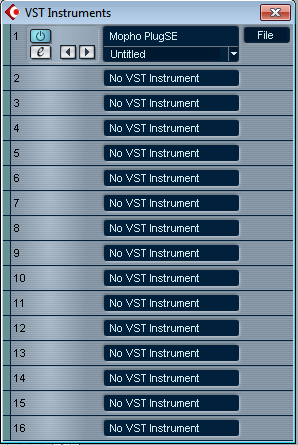
From “Devices” menu select “VST Instruments” and load the Mopho PlugSE.

Start the Mopho PlegSE, the PlugSE will automatically search for the Mopho on all
available ports. If everything is set up correctly, you should notice the “DSI MOPHO
ON LINE” message. If not, a warning message will inform you about incorrect Mopho
Global settings.

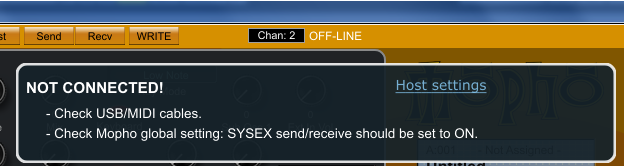
NOT CONNECTED message informs you that the PluSE could not find the Mopho on any ports or the Mopho has not responded to MIDI requests.
In such case, check manually the Mopho global setting called: “MIDI SysEx: ON” just in case it was turned OFF. Please note, you may have to exit the Global settings mode for change to take effect.
Also, some other warnings may pop up like for example Parameter Send or Receive that are used to control the Mopho in real time.
. 
In general, the Mopho Global settings that are relevant for the PlugSE operation should be set as follows:
- MIDI Channel = All channels
- MIDI sysex send/receive = ON
- MIDI Controller Send = ON
- MIDI Controller Receive = ON
- Parameter send = NRPN
- Parameter Receive = ALL
- MIDI Out select = OUT.
To verify the MIDI SETUP, click on the MIDI button:.

Here you can manually set MIDI In and Out ports and configure other MIDI routings. The “Scan” button runs the same MIDI port scan as a MIDI port scan when the PlugSE was started.