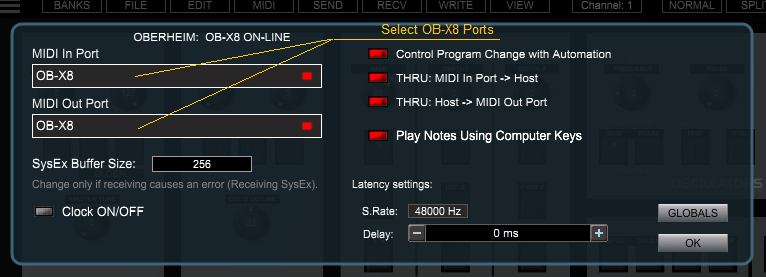
The PlugSE is designed to serve as a bridge between the host and the synthesizer
and in principle the OB-
If you are using a Windows PC many MIDI interfaces including OB-
Here is what you should do:
- Start Cubase session.
- Go to Cubase Studio Setup/MIDI and set both OB-
X8 USB MIDI IN and USB MIDI OUT to Inactive. - Run OB-
X8 PlugSE Intrument type plug- in. - Go to PlugSE MIDI Setup and select OB-
X8 USB in and out. At this point you should have it ON- LINE. - In Cubase, select MIDI track and configure OB-
X8 PlugSE for track's input (if you are using OB- X8 keyboard to play notes) and output. - Go to PlugSE MIDI Setup and select OB-
X8 USB in and out. At this point you should have it ON- LINE.
USING OB-
To establish the proper MIDI communication between OB-
Please make sure that the Global Parameters are set MANUALLY (not through the computer)
on OB-
-
-
-
-
-
-
Also, please make sure that the MIDI track channel has the same MIDI channel as the
OB-