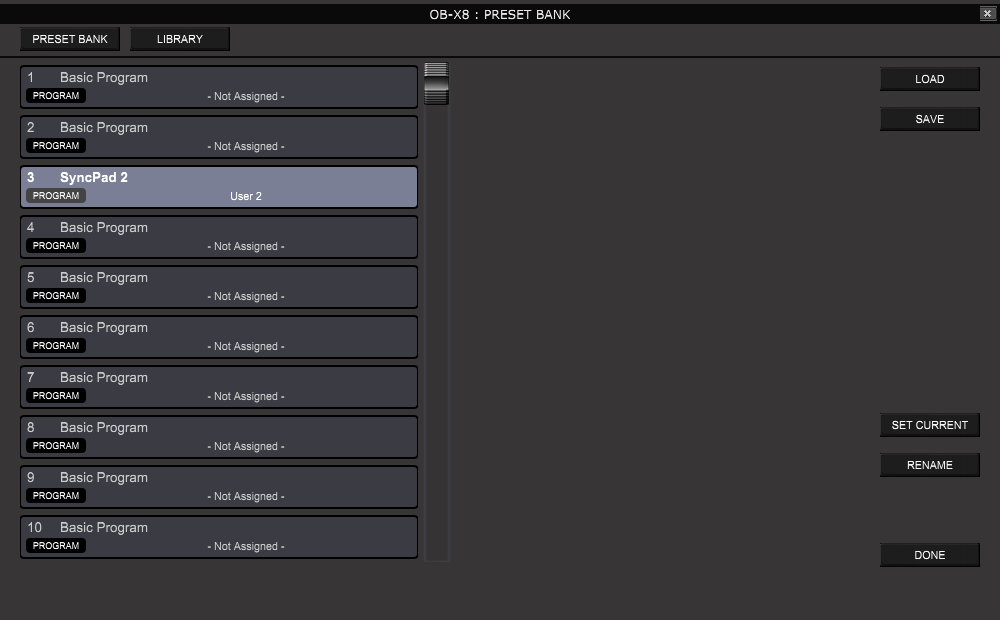
Unlike the Bank Manager, the Preset Manager or Preset List does not select physical
programs from the OB-X8 internal banks. Each VST or AU plug-in comes with its own
separate preset bank. In case of the OB-X8 plug-ins this is a totally separate bank
that should not be confused with OB-X8 USER or FACTORY banks that the PlugSE displays
on the Bank Manager panel.
The PlugSE’s preset bank comes preloaded with Basic Programs.
When you select programs in the Bank Manager, you are selecting programs in OB-X8
internal banks using Bank/Program MIDI commands and selected programs are loaded
from the internal banks to be played.
When you select select presets using the Preset Manager or FX Preset Lists then selected
preset programs are send to the OB-X8 to be played. Preset programs loaded in that
way temporary replace programs in so called Edit Buffer.
The Preset Program Bank data is saved within the VST/AU project and it is loaded
bank when you open a saved project.

LOAD - You can either replace the whole Preset Bank or just load one program to it.
To load just one program, first select destination location on the list and then
select from Load From OB-...
OB-X8 PlugSE presets can contain not only single Voice programs but also Stack programs.
SAVE - Saves the whole Preset Bank or selected single presets.
SET CURRENT- Inserts the currently playing preset program into the Preset Bank.
Select a destination location on the list first. It is the same function that you
are presented with when you open Preset Bank Manager when you click on the “hamburger”
icon.
RENAME - Renames the selected Preset Program.
APPLY - Applies a selected preset program. It selects the current preset location
in the host preset bank and sends the selected program to the OB-X8 Edit Buffer for
playing.
LOAD - There are several options here.
- You can import OB-X8 Library file that you prepared using the OB-X8 editor (*.obx8_lib
file extension Format).
- *.syx (Raw SysEx data) containing OB-X8 program banks.
- *.obx8_bank , OB-X8 Editor bank files.
You can also load programs from OB-X8 USER and FACTORY Program banks.
SAVE - The program library is saved automatically on exit.
You can also export it as a OB-X8 editor Library file (*.obx8_lib file extension
Format).
CLEAR ALL - Deletes all programs from the library. You will be prompted to save
it or cancel.
RENAME - Renames the selected Preset Program.
APPLY - Applies a selected program. It sends the selected program to the OB-X8 Edit
Buffer for playing.
ADD CURRENT- adds the currently playing preset program to the library. You might
be prompted to rename it.
DELETE - Removes the selected program from library.
Preset Manager / Librarian
Preset Manager and Librarian can be accessed by clicking on the hamburger icon located
at top-left corner.
The Preset Manager window has two sections:


Preset Bank Mode manages the preset bank that is used by the DAW host. It is exactly
the same list of presets that the VST/AU host displays for preset selection on a
track.
Note. VST3 plug-ins may not show the FX Preset bank in the host in the same way as
VST2 and Audio Unit plug-in show Preset FX banks.
Also, please not that DAW Preset FX bank list names may not be updated until you
save and reload your project
At first, you will be presented with the dialog that will prompt you to set the current
patch to a slot in the FX bank. You can click on CANCEL button to go straight to
the Preset Bank Manager or select a slot in the FX bank in order to save it for later
use.
The Librarian Mode provides an easy access to OB-X8 librarian files where programs
are organized and saved according to their assigned sound category. To switch to
Librarian Mode click on the LIBRARY button. There are about category 26 buttons under
each the number of programs in that particular category is displayed.

Here the currently selected Program SyncPad is renamed to SyncPad 2 for easier recognition.
Also, the slot number 3 was selected to be replaced.