-
-
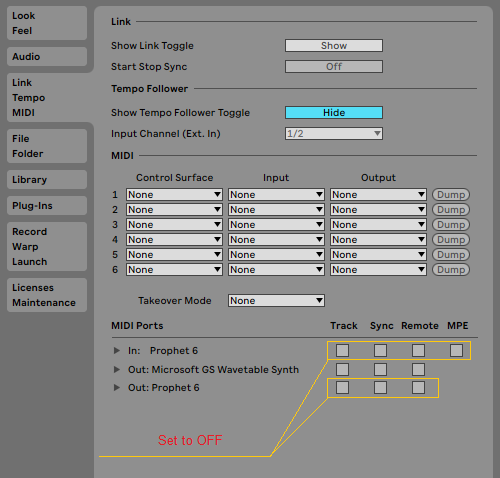
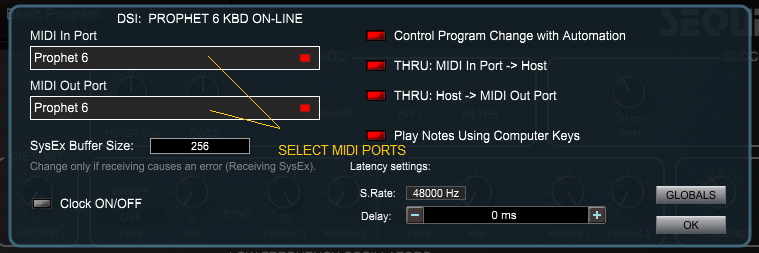
The PlugSE is designed to serve as a bridge between the host and the synthesizer and in principle the Prophet~6 should be connected directly to the PlugSE via MIDI. By default, most of the VST hosts are set to grab all MIDI ports on startup and this may create a connection problem for PlugSE users.
If you are using a Windows PC many MIDI interfaces including Prophet~6 USB MIDI are
not multi-
Here is what you should do:
-
-
USING Prophet~6 PLUGSE IN ABLETON
-
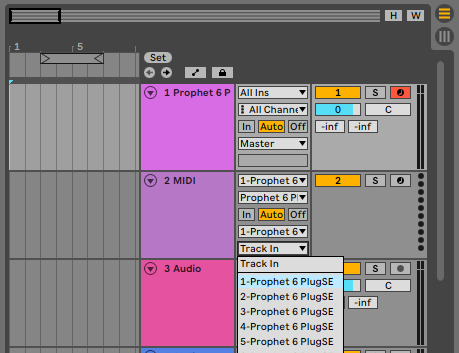
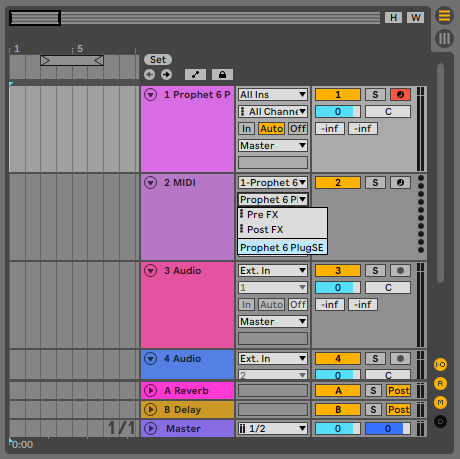
To establish the proper MIDI communication between Prophet~6 and the PlugSE/Editor:
Please make sure that the Global Parameters are set MANUALLY (not through the computer) on Prophet~6 as follows:
MIDI Channel: ALL (ALL)
Param Xmit: NRPN (nr)
Param Rcv: NRPN (nr)
MIDI Control: ON (On)
MIDI Sysex: MIDI (Nid) or USB (USb) depending on your connection
MIDI Out: MIDI (Nid) or USB (USb) depending on your connection
Also, please make sure that the MIDI track channel has the same MIDI channel as the Prophet~6 MIDI Channel or the Prophet~6 MIDI channel is set to ALL.
-