The PlugSE is designed to serve as a bridge between the host and the synthesizer
and in principle the TRIGON-
If you are using a Windows PC many MIDI interfaces including TRIGON-
- Start Cubase session.
- Go to Cubase Studio Setup/MIDI and set both TRIGON-
6 USB MIDI IN and USB MIDI OUT to Inactive. - Run TRIGON-
6 PlugSE Instrument type plug- in. - Go to PlugSE MIDI Setup and select TRIGON-
6 USB in and out. At this point you should have it ON- LINE. - In Cubase, select MIDI track and configure TRIGON-
6 PlugSE for track's input (if you using TRIGON- 6 keyboard to play notes) and output. - Go to PlugSE MIDI Setup and select TRIGON-
6 USB in and out. At this point you should have it ON- LINE.
USING TRIGON-
To establish the proper MIDI communication between TRIGON-
Please make sure that the Global Parameters are set MANUALLY (not through the computer)
on TRIGON-
MIDI Channel: ALL (ALL)
Param Xmit: NRPN (nr)
Param Rcv: NRPN (nr)
MIDI Control: ON (On)
MIDI Sysex: MIDI (Nid) or USB (USb) depending on your connection
MIDI Out: MIDI (Nid) or USB (USb) depending on your connection
Also, please make sure that the MIDI track channel has the same MIDI channel as the
TRIGON-
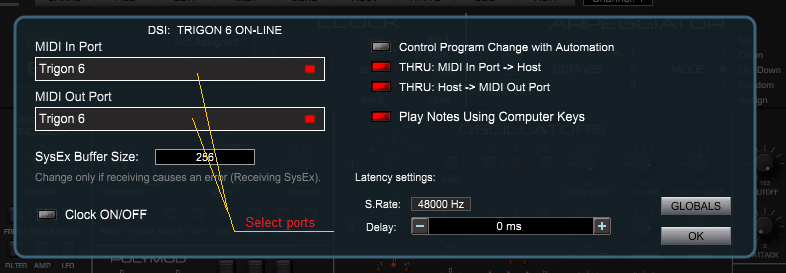
Here is what you should do: