MIDI SETUP
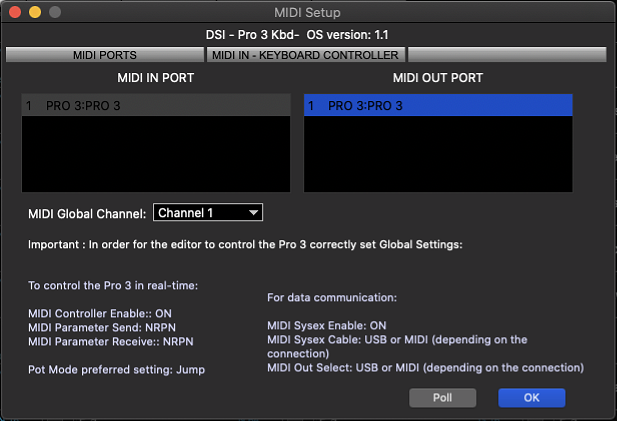
The MIDI setup window (Control+M) can be found under the MIDI window menu. In the MIDI Setup window, select the MIDI IN and OUT ports to which the PRO 3 is connected and set the MIDI Channel to match the MIDI channel on the PRO 3.
Once the proper ports and MIDI channel are selected, you should see the current PRO 3 software version at the top of the MIDI Setup window as shown. This confirms that SoundEditor is communicating with the Sequential PRO 3.
To establish a proper MIDI communication. Make sure that the Global Parameters are set MANUALLY (not through the computer) on PRO 3 as follows.
To control the PRO 3 in real-
MIDI Controller Enable:: ON
MIDI Parameter Send: NRPN
MIDI Parameter Receive:: NRPN
For data communication:
MIDI SysEx Enable: ON
MIDI SysEx Cable: USB or MIDI (depending on the connection)
MIDI OUT: USB or MIDI (depending on the connection)
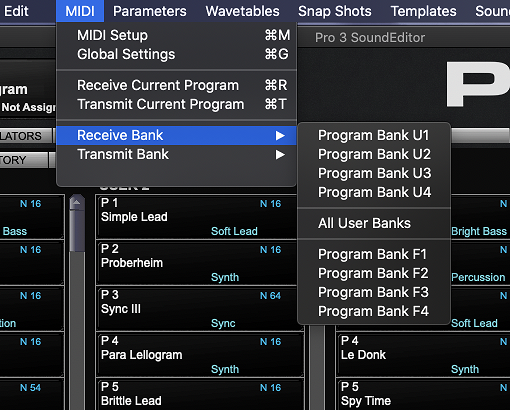
GLOBAL SETTINGS
The PRO 3 Globals (Control+G) can also be found under the MIDI window menu. Please note that some settings that are necessary for maintaining a proper MIDI communication are disabled and cannot be changed directly for the editor.
MIDI WINDOW MENU
Here you can access all functions that will enable the editor to communicate with the PRO 3 and sync the data by receiving all banks.
In the MIDI Setup you can configure which MIDI ports should be used to communicate with PRO 3.
Global Settings panel lets you view all PRO 3 Globals.
Important. Changes made by the editor are not saved automatically on PRO 3.
To write global settings changes you need to enter and exit Globals mode directly on the PRO 3 panel.