

|
|
Page 2 |
MIDI SETUP
Important:
In order for N264/364 to communicate with the computer Global setting EXCL has
to be enabled.
. From the Options menu select MIDI SETUP::
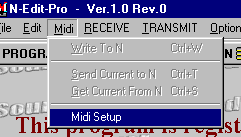
3.Select Midi IN and Midi OUT ports where "N" connected to:

3.Select Midi IN and Midi
OUT ports where "N" connected to:
Press STOP and START. If
midi communication between the editor and the synthesizer is OK then
"N" ROM Version will be displayed.
4. If you have a slow
computer or for some reason your midi has trouble receiving large sysex dumps
then you can increase the "Buffer Size" for Midi In port.
5. If you have another Midi
port with Midi Controller Keyboard hooked to it, you can use it to audition
sounds by selecting MIDI IN (External Controller) port and activating it. This
feature will function properly only if there is separate port available on the
system other than the port that synthesizer is connected to. MIDI In (External
Keyboard) should not be set to the same Midi port as MIDI In (N). If using the
N264 or N364 Keyboard for playing notes, this port should not be activated. This
port is intended only to control Korg® rack synth modules
6. Midi Channel Thru
- If you use keyboard controller to play notes (other than N264/364), the notes
are played on a specific midi channel (1 - 16). If this option in unmarked, the
editor will automatically reroute midi channel to global channel in Program Mode
or selectable channel in combi mode. Midi Channel for playing and auditioning
can be selected in V-Piano or by computer keys
7. If the midi communication is OK then exit MIDI SETUP window.
|
|
Page 2 |