 button to open Library control panel.
 MFX EFFECT SYSTEM LIBRARY
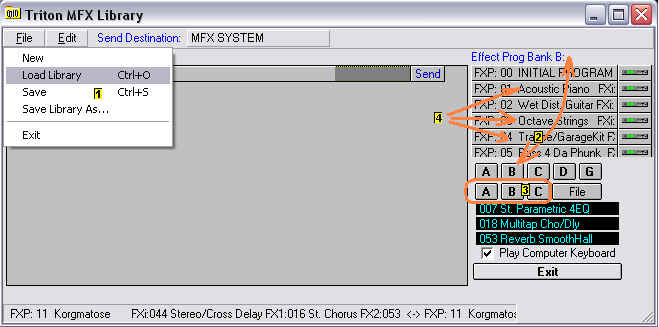
To access MFX Effect System Library click on
button to open Library control panel.
You can choose to load a pre-existing
library of effects through File  option
  or
create one from Program Banks A through GM
or
create one from Program Banks A through GM  or Combi Banks A, B or C
  .
.
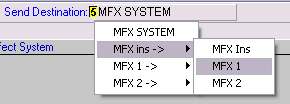
Send Destination is set by clicking on button to the right of Send
Destination  and
mousing to desired MFX send/receive combination.
and
mousing to desired MFX send/receive combination.
If effect is to be applied to a current program from one of the Program
Bank presets select this program by left clicking in list  and then clicking the send icon
  .
.
To create a library from a selected Program Bank, the selected effect from the
Program Bank in Effect list must be selected with a left click and then either
right click to copy or use Menu  to select copy. Left click on main screen
  and either right click and select Paste Add or use Menu
  .
Repeat for each effect file desired.
.
Repeat for each effect file desired.
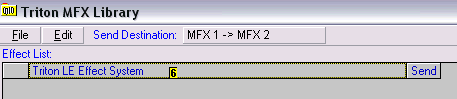
Selected files can be sorted alphabetically through Menu  .
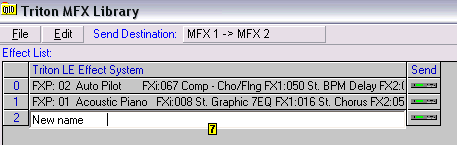
The selected files can be renamed by double clicking on the file name in main
screen and typing in new file name
.
The selected files can be renamed by double clicking on the file name in main
screen and typing in new file name  .
Effects are sent from the library using the
.
Effects are sent from the library using the  button.
Save the generated Effect files through Menu  "Save File As." MFX Library files are saved with .lfx extension.